MemberDash offers a variety of add-ons to extend functionality and customize the membership experience. One useful add-on is Redirect Control, which allows you to manage where users are redirected after logging in or logging out. This guide explains how to enable the Redirect Control add-on and configure its settings.
Note: To view a list of all available add-ons and enable the ones you want, go to MemberDash >Modules.
Enabling the Redirect Control Add-on
To view and manage available add-ons:
- Go to MemberDash > Modules.
- Review the list of available add-ons and enable the ones you need.
To enable Redirect Control:
- In MemberDash > Modules, scroll down to find the Redirect Control section.
- Click the toggle switch to enable it.

Once enabled, a new Redirect section will appear in the MemberDash > Settings page.
Configuring Redirect Settings
To set up custom redirects:
- Go to MemberDash > Settings > Redirect.
- From this page, you can choose where users are redirected after:
- Logging in
- Logging out
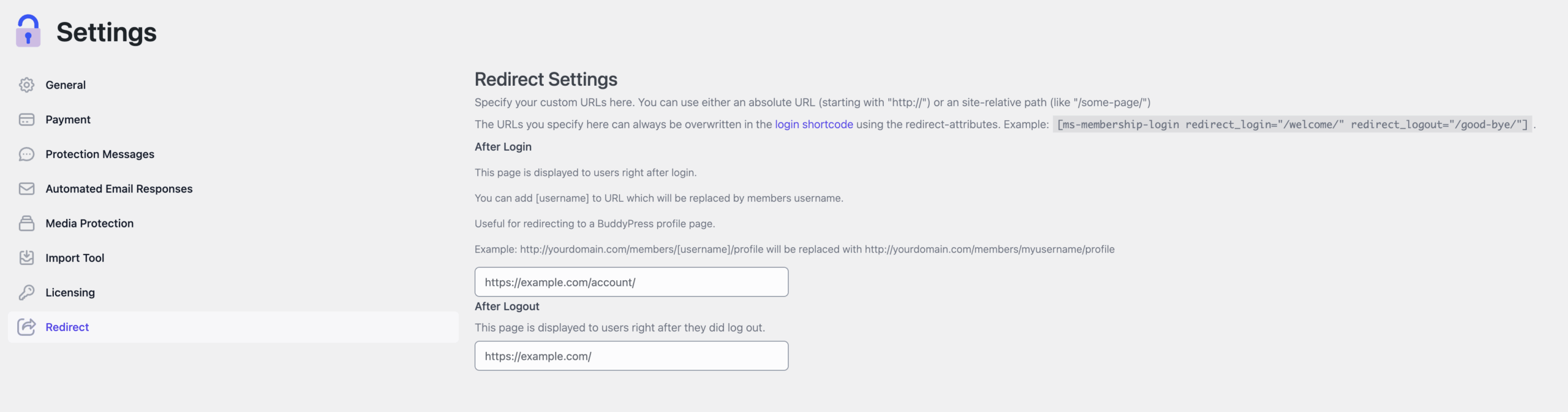
These settings allow you to tailor the post-login and post-logout experience to better suit your site’s goals.
Conclusion
The Redirect Control add-on provides flexibility in guiding user navigation after key membership actions. By customizing login and logout redirects, you can improve user flow and create a more seamless site experience.