The Pro-Rating feature in MemberDash allows you to fairly adjust membership billing when users upgrade or downgrade without canceling their subscription in between. This ensures members are charged accurately based on their remaining subscription time. This guide explains how pro-rating works, when it applies, and how to enable and configure it.
Note: To view and enable additional add-ons, visit MemberDash > Modules.
Enabling the Pro-Rating Add-On
To enable the Pro-Rating feature:
- Go to MemberDash > Modules.
- Locate the Pro-Rating module.
- Toggle the switch to ON to activate it.

How Pro-Rating Works
- Pro-Rating Applies When:
- A user upgrades or downgrades their membership directly (without canceling first).
- Membership changes occur in a single step.
- Pro-Rating Does Not Apply When:
- A user cancels a membership and later subscribes to a different membership in a separate transaction.
- These are treated as independent memberships and charged accordingly.
Membership Cancellation Behavior
- When a user cancels their membership, access typically continues until the end of the current billing period.
- Exception: Permanent access memberships expire immediately upon cancellation.
Pro-Rating and Multiple Memberships
When using the Pro-Rating feature, how membership changes are handled depends on whether the Multiple Memberships Add-On is enabled or disabled. The rules for pro-rating and access vary between these two setups.
When the Multiple Memberships Add-On is Disabled:
- Changing memberships automatically expires the old membership and starts a new subscription in a single step.
- Pro-Rating is always applied in this scenario.
When the Multiple Memberships Add-On is Enabled:
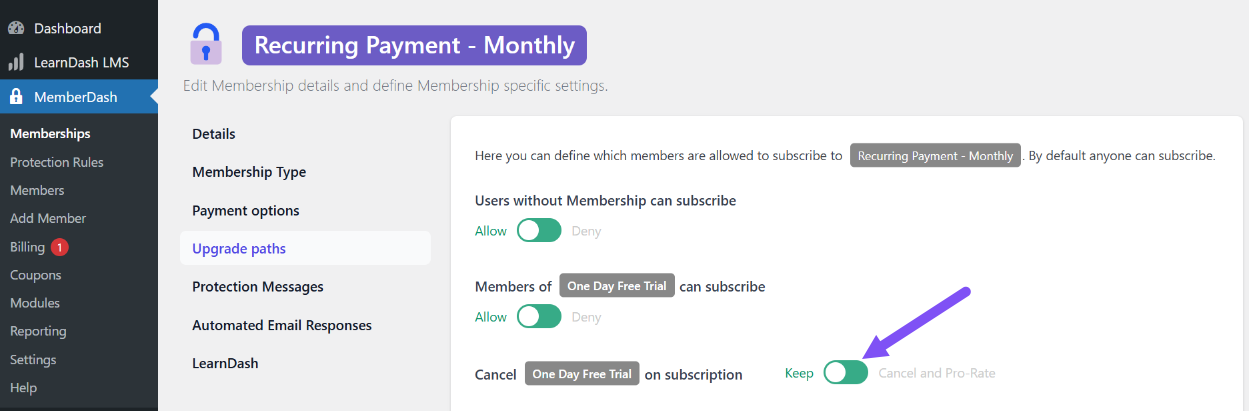
- Pro-Rating applies only if you manually enable the Cancel and Pro-Rate option.
- To enable:
- Go to MemberDash > Memberships.
- Hover over the membership you want to edit.
- Click Upgrade Paths.
- Enable the Cancel and Pro-Rate option for the appropriate upgrade path.
- If this option is not enabled:
- The system will follow the default behavior:
- The user retains access to the old membership until the end of the current billing cycle, even if they cancel early.
- Pro-Rating is not applied in this case.
- The system will follow the default behavior:
Conclusion
The Pro-Rating feature offers flexibility and fairness when users change memberships mid-cycle, but it’s important to configure it correctly based on whether your site supports multiple memberships. Understanding how pro-rating interacts with your membership setup ensures accurate billing and a smoother user experience.